Picture your morning.
You sit down with coffee. You open your laptop. And before you do anything else, you spend the next 45 minutes catching up.
Email triage. Slack scroll. Pipeline check. Calendar review. Then you finally start your actual day.
By 9:30am, you have done a lot of work and produced zero output. You are not behind exactly, but you are not ahead either. You are just caught up enough to start the day you were supposed to start at 8.
Now picture this instead.
You sit down with coffee. You open ONE document, dashboard, or email. It tells you exactly what happened between 6pm yesterday and 6am today.
What needs your attention. What is on fire. What can wait. What your team committed to. What deals moved. What hit your inbox that actually matters.
You read it in 4 minutes. You know your day. You start.
That is the morning briefing. And it exists. You just have to build it. So here is exactly how.
What the briefing actually pulls from.
The briefing is not magic. It is a small set of sources, summarized the right way.
Email summary. Your inbox gets scanned for anything sent overnight, sorted by importance (clients, prospects, internal, vendors, noise), and summarized in 3 to 5 lines per category.
Slack catchup. Every channel you are in gets a one-line summary of what was discussed while you were offline. Mentions of you get flagged. Decisions made get called out.
The 90 messages in the team channel become "team is shipping the v2 launch Thursday, Brittany is blocked on the design review, Marcus has a question on pricing."
CRM movement. Anything that changed in your CRM overnight (new leads, stage changes, closed deals, lost deals, notes added) gets surfaced. You see your pipeline before you open it.
Calendar preview. Your day's meetings, with a one-line context summary for each. Who you are meeting, what you talked about last time, what is likely on their mind.
The one most important thing. One line at the top of the briefing: the single thing that should get your attention before anything else today.
All of it. In one place. Waiting for you.
How to actually build this in Claude.
You do not need Zapier. You do not need Make. You do not need a 17-step automation chain held together with duct tape.
Claude has built-in connectors for the tools you already use. Gmail, Slack, HubSpot, Google Calendar, Asana, Notion, Google Drive, the whole list.
Flip Claude over to Cowork mode (it lives in the desktop app), connect the tools, and Claude can read all of those, pull the data, and write the briefing in one shot.
Here is the setup.
1. Open Claude in the desktop app and switch on Cowork mode. (Settings, Cowork, on.)
2. Open Claude's Scheduled Tasks panel. Create a new task that runs every weekday at 6am.
3. Paste in the prompt below. Save.
4. The first time you save, Claude will ask permission to connect to each tool the prompt mentions. If a connector is not set up yet, Claude will walk you through the 2-click OAuth flow right there. If you are not sure which connectors you need, paste the prompt and let Claude tell you what is missing.
5. The first briefing lands in your chat at 6am the next workday. Read it. Edit the prompt. Re-run. Iterate until it sounds the way you want it to sound.
That is the whole build. No Zapier subscription. No connector hunting. No glue code.
Copy this. Paste it into your scheduled task. Then tweak.
Every weekday at 6am, pull together my morning briefing using these sources for the period 6pm yesterday through 6am today.
Email (Gmail). Scan messages received in the window. Sort into 4 buckets: clients, prospects, internal/team, vendors. Skip newsletters and promotional. Summarize each bucket in 3 to 5 lines, highest priority first. Flag anything that needs a reply today.
Slack. For each channel I am a member of, give me a one-line summary of what was discussed overnight. Flag any direct mentions of me. Call out any decisions that were made without me.
CRM (HubSpot). List any deals that changed stage, any new contacts added, any deals that closed or were lost. One line each.
Calendar (Google). List today's meetings in time order. For each, give me a one-line context note: who I am meeting, what we last talked about if there is a recent thread, what is likely on their mind.
Top of the briefing. ONE LINE: the single thing that should get my attention before anything else today.
Format the whole thing as one document, max 1 page. No greetings. No fluff. Just the briefing.
That is the version I sent a client last month who was losing the first hour of every day to inbox triage. Now he reads the briefing while the coffee brews.
If writing your own prompt feels like too much.
Open Claude in Cowork mode, hit Schedule, then New Task with Claude. Claude will walk you through it.
First, it asks what kind of task this is. The options are: a morning briefing, a watch and alert, a recurring deliverable, or a one-time reminder.
Then it walks you through how often you want it to run, which tools to pull from, and what kind of update you actually want. The flow narrows things down with you instead of leaving you to guess.
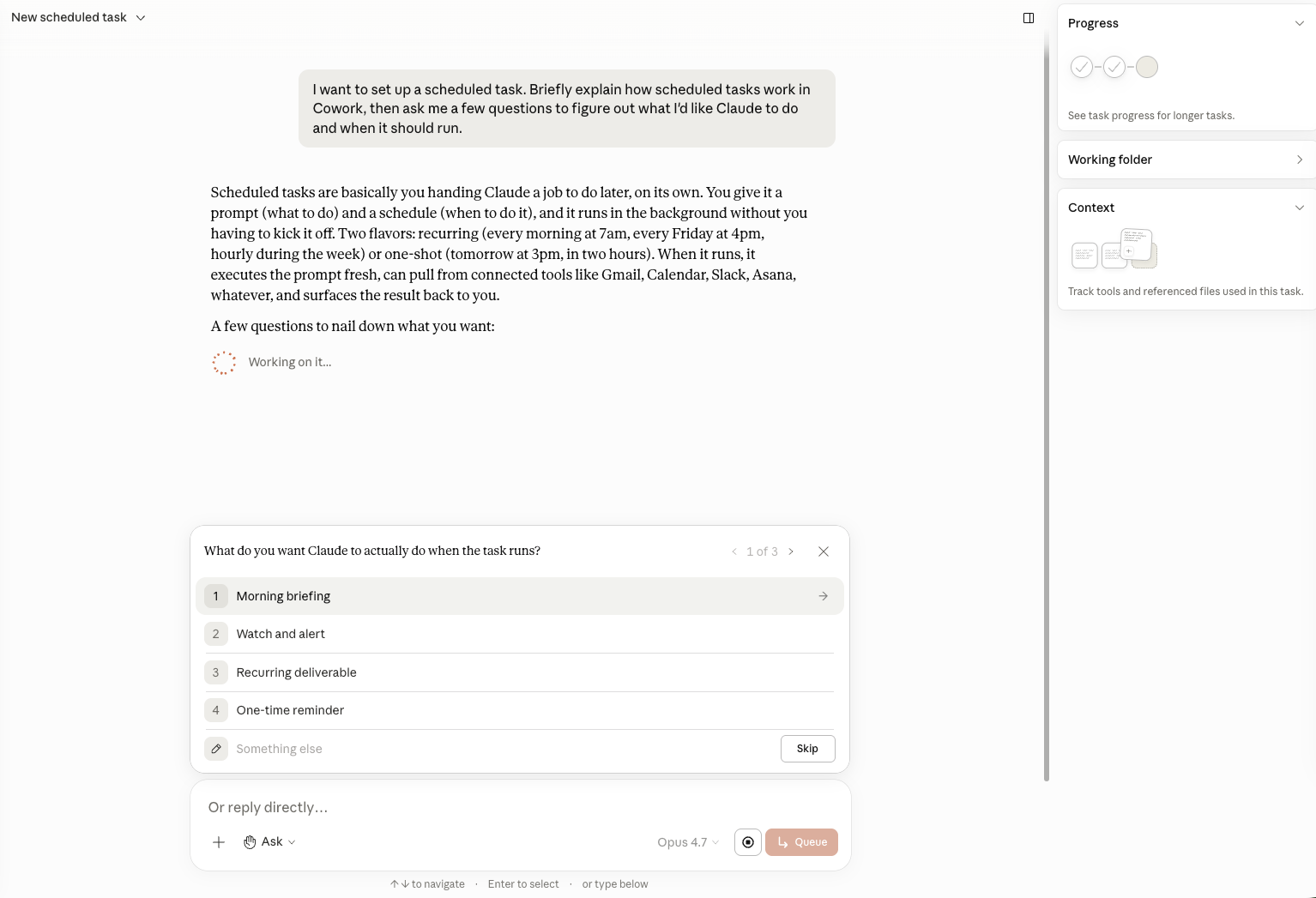
When I first set up my own morning dashboard, I overscoped it. I tried to include everything that updates overnight, which is a lot, and the briefing turned into another inbox to triage.
The guided flow forces you to pick what is actually important versus what is just an update you can skip. Take the help.
What to tune.
Either path (your own prompt or the guided flow) gets you 80 percent of the way. The other 20 percent is the part that makes it yours.
The 4 buckets. Probably are not "clients, prospects, internal, vendors" for your business. Maybe yours is "active projects, sales pipeline, finance, everything else." Change them.
The "one most important thing" line. This is the part that takes the most iteration. Claude will pick a reasonable thing on day one. You might want it weighted toward sales activity, or team blockers, or client risk. Tell it. It learns.
The format. If you want bullets, ask for bullets. If you want a paragraph per section, ask for that. If you want the briefing dropped into a Notion page instead of a chat message, Claude can do that too.
You will spend 2 to 3 days tweaking. After that, it just runs.
If you want help dialing it in.
This is exactly the kind of thing I do inside an AI Power Hour. 60 minutes together, I pick the 3 AI workflows that will save you the most time (this one is almost always in the top 3), and you walk away with the prompts, the connector setup, and a written build plan, plus 30 days of email support while you actually do it. $197.
If you would rather hand it off entirely, book a call and we will scope the done-for-you version.
Or wait for next Monday. Week 3 is the one about meeting notes turning themselves into tasks, recaps, and follow-up emails. It is the one most of you are going to want first.